

FSA-60000 Smoke Alarm Troubleshooting Guide
TESTING YOUR FSA-60000 SMOKE ALARMS
We recommend testing your FSA-60000 Smoke Alarms monthly to confirm they are working correctly.
|
1. Check that the green LED is illuminated on each alarm. This confirms that mains power is connected. |
|
2. Press and hold the TEST button on any alarm for 5 seconds. Note: Once you release the TEST button, all interconnected alarms will stop sounding, and the red LED on each unit will continue flashing for 3 minutes to indicate a successful test. |
|
3. Repeat this test on all alarms in the system. |
For more guidance, watch the video:
| How to test MATelec FSA-30000 and FSA-60000 Smoke Alarms
|
| LED SIGNALS & AUDIBLE ALERTS REFERENCE TABLE | ||
|---|---|---|
| Operation | Red LED Status | Sound |
| Power Up | Flash |
|
| Alarm Functioning Correctly (Standby) | Low intensity 1x flash every 40 seconds | - |
| Alarm Memory | Triggered alarm Flashes Twice every 20 seconds for 1 week | - |
| Low Battery Warning | Flash every 40 seconds |
|
| Fault Warning | Flash every 40 seconds |
|
| Self-test Fault Warning | Flashes twice every 40 seconds | - |
| HUSH Mode | Flash once every 8 seconds for 10 min | - |
| Do Not Disturb | Flash once very 40 seconds for 10 hours | - |
| Smoke Detected on Local Alarm | Flash every second | Continuous alarm signal pattern, Press HUSH button to enter Silent Mode for 10 min. Initiate emergency plan |
| Smoke Detected on Interconnected or Paired Unit | - | Continuous alarm signal pattern, Press HUSH button to enter Silent Mode for 10 min |
| Test Function | Flash every second | Continuous alarm signal pattern until TEST button released |
| Weekly Self-Test | Flash once | Chirps once every week |
| End of Life (10 year) Warning | Flashes once every 40 seconds |
|
FACTORY RESETTING FSA-60000 SMOKE ALARMS
To restore your FSA-60000 Smoke Alarms to their factory settings:
|
1. Turn off the mains power and remove the battery. |
|
2. Press and hold the Test button while reinserting the battery. |
|
3. The red LED will illuminate for 3 seconds. |
|
4. When the red LED turns off, release the Test button. |
|
5. When the red LED lights up again for 3 seconds, press the Test button once to unpair and complete the factory reset. |
|
6. The alarm will chirp three times to confirm a successful reset. |
For more guidance, watch the video:
| How to Factory Reset MATelec FSA-60000 Smoke Alarms
|
HOW TO INSTALL THE FSA-50000 WIRELESS MODULE INTO AN FSA-60000 SMOKE ALARM
The DET-SMK/AC/1 Smoke Alarm includes a one-year alkaline backup battery designed to keep the alarm operating during a power outage. This battery should be replaced every 12 months.
|
1. Press the Push button to open the smoke alarm. |
|
2. Take out the dummy module and insert the wireless module in its place. |
|
3. Pull out the battery tab. |
|
4. The alarm will sound three short chirps to confirm it’s powered and ready to be paired. |
For more guidance, watch the video:
| How to install the MATelec FSA-50000 Wireless Module into an FSA-60000 Smoke Alarm
|
IDENTIFYING AND RESETTING A TRIGGERED FSA-60000 SMOKE ALARM
CHECK FOR A TRIGGERED ALARM
|
1. A triggered alarm will show a flashing red LED. |
|
2. It will flash while alarming and then flash twice every 20 seconds for up to a week after activation. |
IDENTIFY WHETHER A WIRELESS MODULE IS INSTALLED
|
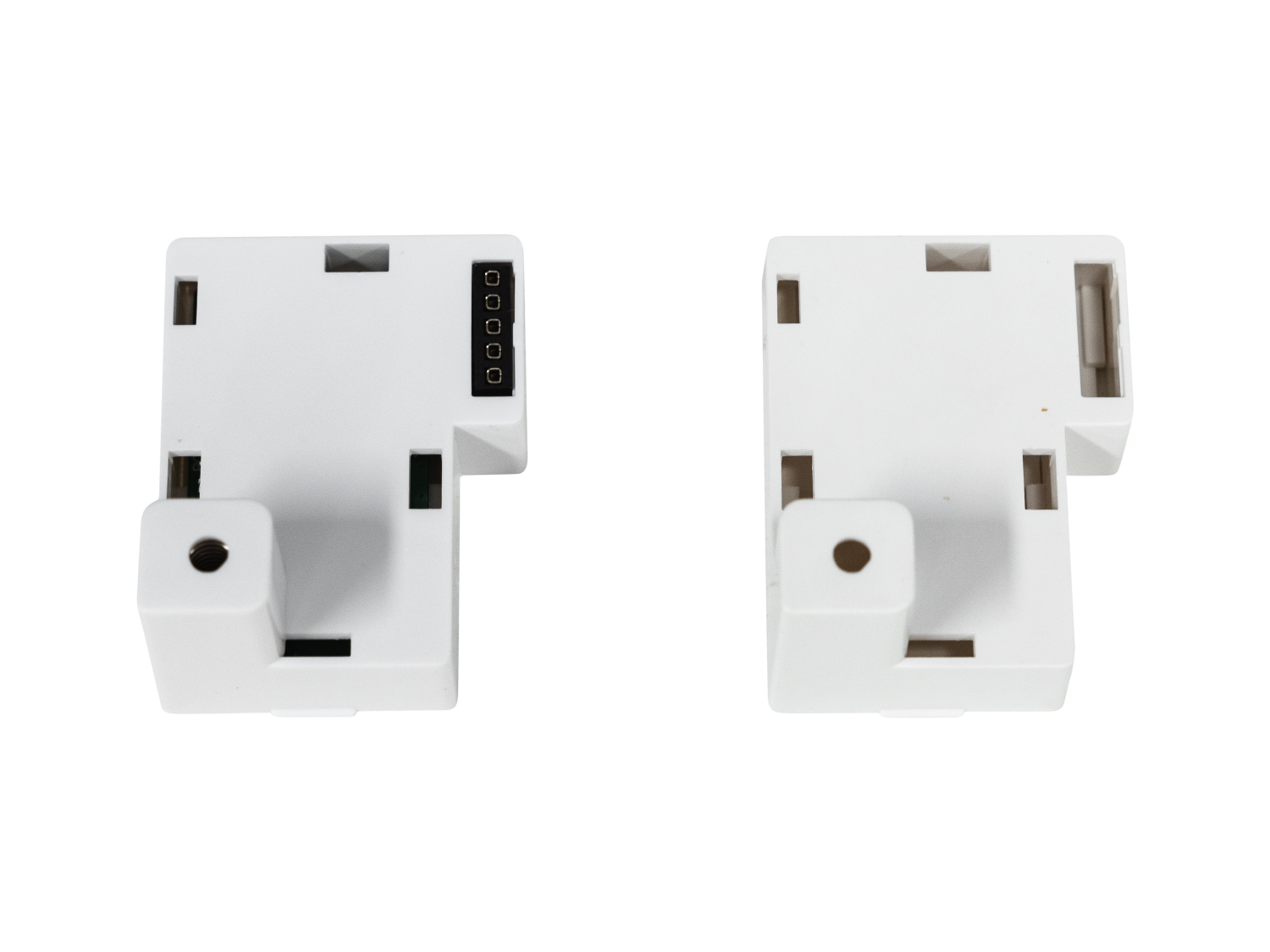
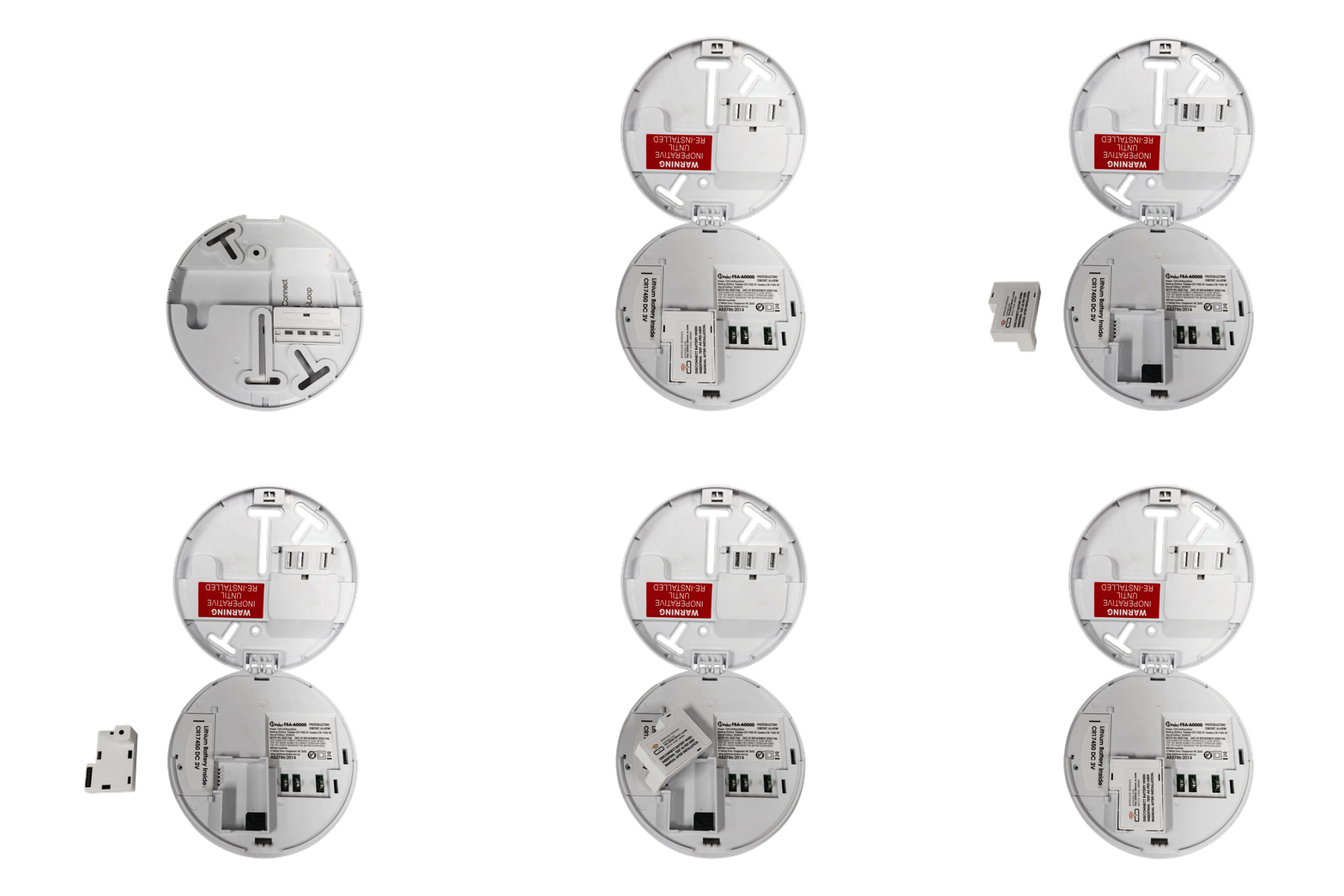
1. Remove the alarm from the ceiling. |
|
2. Compare the module inside your alarm with the images below. |
|
3. If the module compartment is empty, the alarm is not using a wireless module. |
|
|
 |
RESETTING THE ALARM (WITHOUT A WIRELESS MODULE)
|
1. Remove the battery from the alarm. |
|
2. Press and hold the Test button for 15 seconds. |
|
3. Reinsert the battery. |
|
4. The alarm is now reset. |
RESETTING THE ALARM (WITH A WIRELESS MODULE)
|
1. Remove the battery from the unit. |
|
2. Press and hold the Test button. |
|
3. While still holding the Test button, reinsert the battery. |
|
4. Release the Test button once the red LED turns off. |
|
5. Press the Test button again. |
|
6. The alarm will chirp once, pause, then chirp three times, confirming a successful reset. |
FSA-60000 PAIRING INSTRUCTIONS
|
1. Choose a Master alarm. Press the test button 3 ties within 2 seconds to enter paring mode. This alarm will remain in pairing mode for 5 minutes. |
|
2. On any of the other alarms, press the Test button 3 times within 2 seconds to enter pairing mode. |
|
3. If pairing is successful, the Master alarm will chirp, and other alarms LED will extinguish and chirp. |
|
4. Close the network buy holding the Test button on the Master alarm until the LED extinguishes. |
For more guidance, watch the video:
| How to pair MATelec FSA-60000 Smoke Alarms
|
CROSS MODEL PAIRING INSTRUCTIONS
For more guidance, watch the video:
| How to pair a MATelec FSA-60000 Smoke Alarm with FSA-30000 Smoke Alarms
|
FSA-90000 REMOTE CONTROL PAIRING
| Pairing the MATelec FSA-90000 Remote with FSA-30000 and FSA-60000 Smoke Alarms
|
RELATED RESOURCES
Smarter Smokie Guarantee
Download: Specification Sheet
Download: Manual
MATelec Australia Technical Support
Contact Form | 1800 281 282 | Email Support
